
Web SDK
Perso Interactive Web SDK enables developers to build real-time, voice-enabled AI avatars in the browser.
The Perso Interactive Web SDK is a browser-first SDK designed for creating interactive AI avatars and chat experiences with low-latency audio, video, and text streaming.
It handles session creation, real-time WebRTC connections, and event-driven chat state updates while allowing developers to configure STT type, TTS type, LLM type, background image, prompts, and documents.
Demo App InstallationLearn how to install Perso Interactive Web SDK Demo App.
Perso Interactive Web SDK RepositoryLearn how to install and fully configure Perso Interactive Web SDK.
🌟 Key Features
Real-Time AI Avatars
Interact with AI avatars with real-time audio, video, and text streaming.
Conversational AI Pipeline
A configurable STT → LLM → TTS pipeline enabling natural, low-latency AI conversations in the browser.
Configurable Session Architecture
Dynamically select models, prompts, documents, backgrounds, tools, and MCP servers per session.
Browser-Native & Secure
Runs entirely in modern browsers using WebRTC, with flexible server-side or client-side session creation.
ℹ️ How It Works
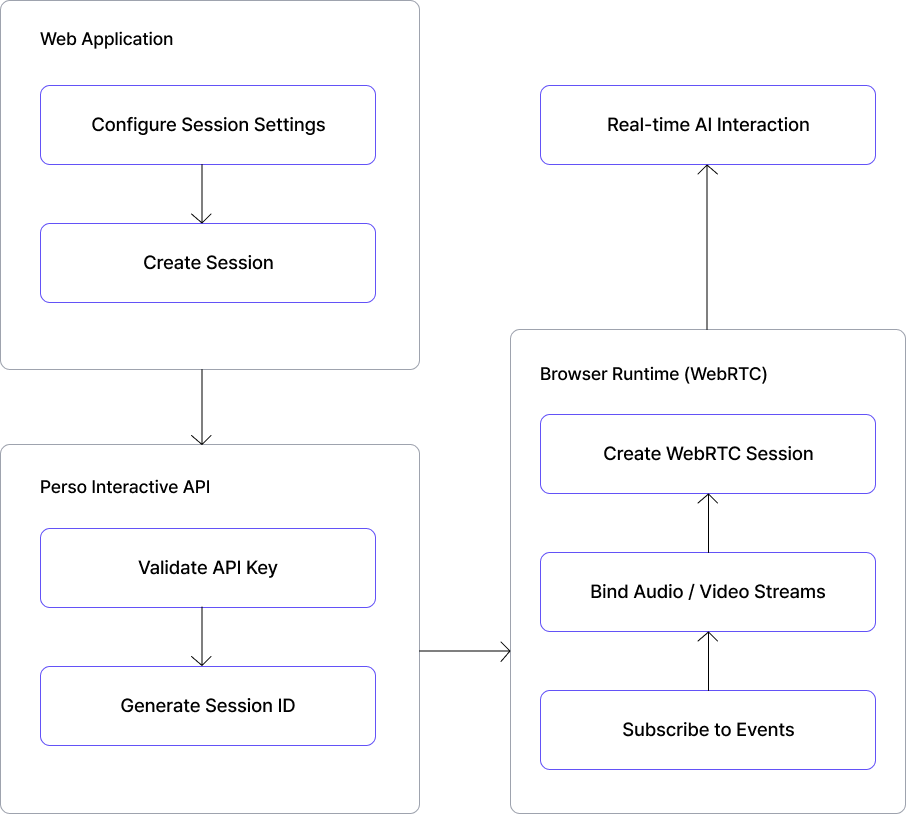
The Perso Interactive Web SDK connects your web application to the Perso AI Platform through a real-time WebRTC session.
Integration starts by fetching available session settings (STT type, TTS type, LLM type, background image, prompts, and documents) creating a session ID using your API key, and then establishing a WebRTC connection in the browser.
Once connected, your application subscribes to chat states and events to render messages, control voice input/output, and handle tool calls in real time.
Updated 7 months ago
What’s Next
Learn how to install Perso Interactive Web SDK and demo apps in the next section.